Voice ReGen Service Architecture
Architecture Overview
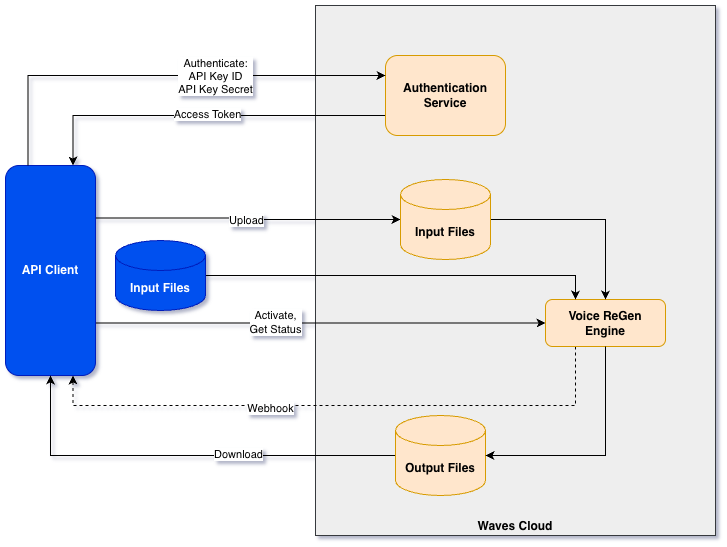
The diagram above shows the Voice ReGen API architecture. A typical Voice ReGen API workflow includes these steps:
- Authenticate with Microsoft Entra ID and include the bearer token in each API request.
- Register an input file using one of two methods:
registerFileto get a signed upload URL, then upload the file bytes.registerFileFromUrlto let Voice ReGen pull the file from customer-hosted storage.
- Start processing with
startProcess. - Track progress by polling
getFilesStatusor receiving webhook callbacks. - Download the processed output by calling
getOutputFileUrland using the returned signed download URL.
The following sections describe the flow in greater detail.
Environments
The Voice ReGen API is available in two separate environments:
| Environment | Path | Purpose |
|---|---|---|
| Sandbox | /sbx/vrg | Development and testing — use this while building your integration. |
| Production | /prd/vrg | Live workloads — switch here once your integration is validated. |
Both environments share the same API surface, authentication scheme, and behavior. API keys and access tokens are scoped per environment, so credentials obtained for Sandbox will not work against Production and vice versa.
Authentication
All endpoints require Authorization: Bearer <access_token>. Tokens are obtained from Microsoft Entra ID using the client_credentials flow. See Authentication for the copy/paste request and token caching guidance.
Input and Output Files
Input files can be registered using one of two methods:
- Upload the file to Voice ReGen storage using a time-limited signed URL returned by
registerFile. - Provide the Voice ReGen service with a link to customer-hosted storage. This method uses the
registerFileFromUrlendpoint.
Output files are stored in Voice ReGen storage. The API client downloads them by calling getOutputFileUrl and using the returned time-limited signed URL.
File Identifier: file_id
Each input file processed by the Voice ReGen service is assigned a unique ID called file_id. Customers use this ID to track processing status and retrieve the relevant outputs.
Tracking Processing Status
Once processing is started with the startProcess call, the API client can track status in two ways:
- Polling: call
getFilesStatusuntil the status isSucceeded. - Webhooks: configure a webhook URL in the Developer Portal and enable it via
startProcessoptions to receive progress/status callbacks.
Error Interface
Errors are standardized across endpoints. For detailed schema definitions, see the API reference:
Workflow Diagram
The Getting Started section provides a step-by-step walkthrough using cURL.